Video Doorbell Installation Basics: Essential Home Security Setup Guide
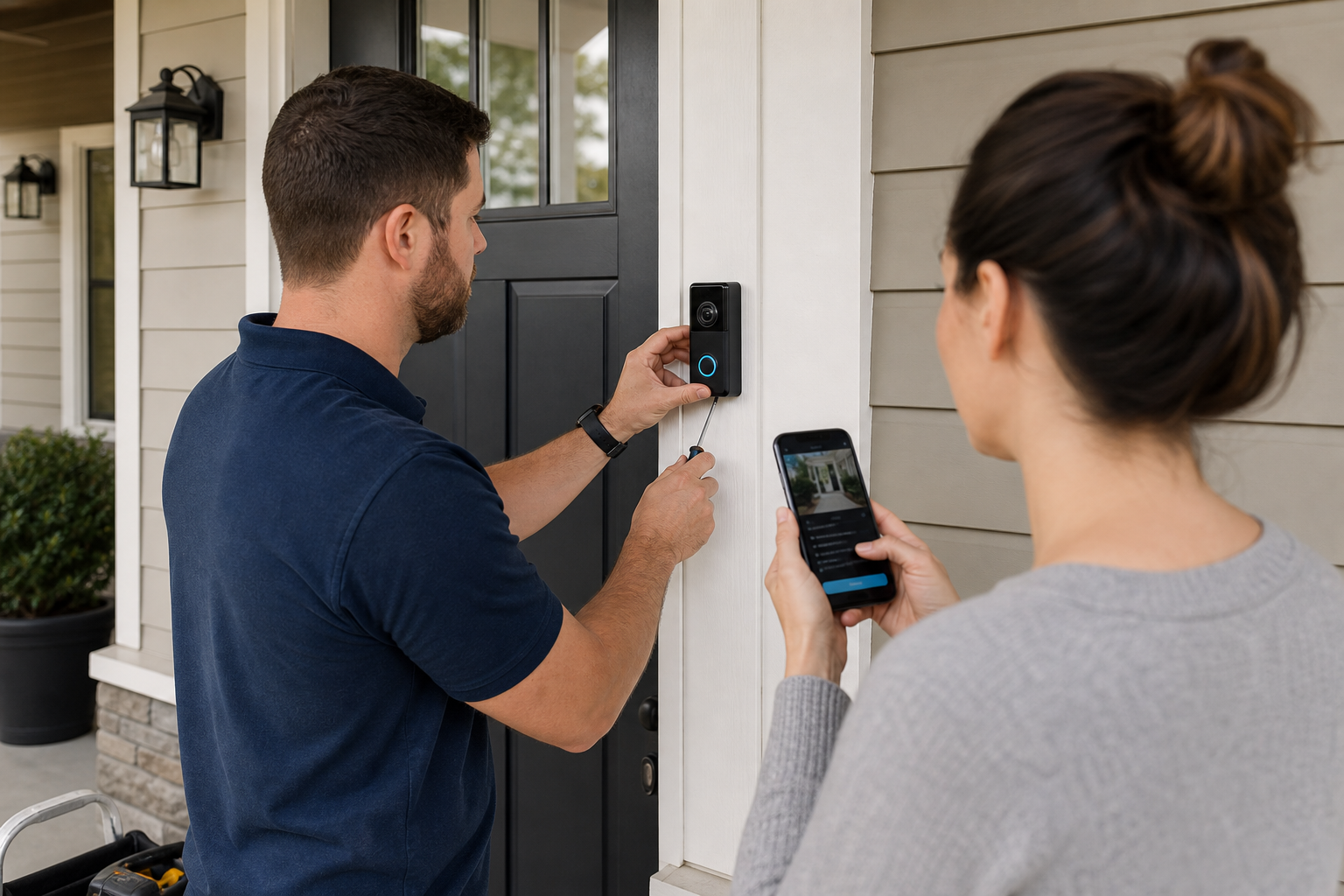
Smart video doorbell installation starts with a simple decision: choose a device and mounting method that fit your door, power source, and Wi-Fi before anyone drills or connects wires.
A video doorbell can be a practical first upgrade for home security because it adds a camera, motion alerts, and two-way audio at the front entry without requiring a full alarm system. According to the Cybersecurity and Infrastructure Security Agency, home devices that connect to your network should be set up with strong passwords, updated software, and secured Wi-Fi. For a doorbell camera, that means installation is only part of the job. Placement, power, app security, and network reliability matter just as much.
What should you check before buying a smart video doorbell?
The right unit depends first on your existing doorbell power, your entry layout, and the strength of your Wi-Fi signal at the front door.
Most manufacturers publish two basic installation paths: battery-powered mounting or hardwired mounting to an existing low-voltage doorbell system. Ring, in its Video Doorbell installation guidance, and Google Nest, in its Nest Doorbell support documentation, both separate these options because the installation steps, charging routine, and chime compatibility can differ by model.
Before you buy, confirm five things:
- Whether you already have a working wired doorbell
- Whether your indoor chime is compatible, if you want to keep it
- Whether your front door area has enough Wi-Fi signal
- Whether the camera angle can capture visitors without pointing into a neighbor’s private space
A more expensive model is not automatically the better fit. If your existing wiring is unreliable or you rent and cannot alter trim or brick, a battery model may be the better choice even if a wired model offers longer continuous operation.
Where should a video doorbell be installed for the best view?
The best results usually come from mounting the camera at the manufacturer’s recommended height and aiming it to capture faces and the package drop-off space without an extreme upward or downward angle.
Manufacturer guidance is unusually important here because each camera lens has a specific angle of view. For example, Ring installation materials commonly suggest placement to be roughly 48 inches above the ground, while Google Nest guidance provides model-specific placement recommendations based on field of view. Following their published height range helps motion detection and visitor framing work as intended.
Mounting too high is one of the most common mistakes. A high position may show the top of a person’s head and miss packages near the threshold. Mounting too low can increase false alerts from close foot traffic, plants, or passing pets.
What can interfere with the camera view?
Storm doors, sidelights, porch columns, and reflective surfaces can all reduce image quality or motion performance.
Glass is especially tricky. If the camera sits behind storm-door glass or faces strong reflections at night, infrared night vision can bounce back into the lens and wash out the image. Manufacturer support documents from Blink and Arlo both warn that glass placement can affect night visibility and motion sensing.
A porch light can help nighttime image quality, but it should not shine directly into the lens.
Do you need wiring, or is a battery video doorbell enough?
A battery model is often enough for homes without existing doorbell wiring, while a hardwired model usually makes more sense if you want continuous power and less charging maintenance.
According to the National Fire Protection Association, household electrical work carries shock and fire risk when wiring is altered incorrectly. For that reason, adding new transformer wiring, replacing incompatible components, or troubleshooting unstable low-voltage doorbell circuits is better handled by a qualified installer or electrician rather than treated as a casual DIY project.
Battery models are simpler to mount because they usually need only anchors, screws, and app setup. The tradeoff is maintenance. You will need to recharge or replace the battery on the schedule stated by the manufacturer, and that schedule changes with motion frequency, temperature, recording settings, and live-view use.
Hardwired models reduce that routine upkeep, but they are not universal replacements for older systems. Some require a compatible transformer voltage range and may need a specific chime connector or bypass part. Ring and Google Nest both publish compatibility requirements in their support materials, and those details should be checked before purchase.
When is professional installation the better option?
Professional help is the safer choice when there is no existing doorbell, the wiring is old or inconsistent, the exterior surface is masonry, or the installation involves a multi-device security setup.
For a broader look at pricing factors, Abodence’s security camera installation cost guide explains how labor scope and wiring complexity can affect home security project costs.
How strong does your Wi-Fi need to be for a smart video doorbell?
A stable signal at the front door matters more than peak internet speed because video doorbells depend on consistent connectivity for alerts, live view, and recorded clips.
According to the same CISA home network guidance, securing and maintaining your home network is a basic part of using connected devices safely. In practice, that means placing your router well, using current encryption settings, installing firmware updates, and avoiding weak default credentials.
If your phone already drops Wi-Fi near the front porch, the doorbell may struggle there too. In that case, moving the router, adding a mesh node, or using a compatible extender may solve the problem without changing doorbell models.
Signal strength should be checked before final mounting, not after the holes are drilled.
What settings affect performance after installation?
Motion zones, video quality, notification frequency, and recording preferences all change how the device behaves day to day.
Tighter motion zones can cut down on alerts from sidewalks or streets. Higher video quality can improve detail, but it can also increase battery drain on battery-powered models. Most major manufacturers describe these tradeoffs in their support documentation, and they are worth reviewing during consideration rather than months later when the alerts become annoying.
What does a clean and secure installation include?
A solid installation includes stable mounting, weather-appropriate sealing where allowed by the manufacturer, consistent power, app setup, account security, and a full test of video, audio, motion alerts, and chime behavior.
This is where many rushed installs fall short. The device may turn on, but that does not mean the job is finished. The app should be connected to the correct home account, software updates should be installed, and two-factor authentication should be enabled if the platform offers it. The FTC advises consumers to secure smart devices with strong passwords and available security features, and that guidance applies directly to camera doorbells.
For outdoor mounting, use the hardware specified by the manufacturer for the wall material. Wood trim, vinyl siding, stucco, and brick all require different fastening approaches. If the mounting surface is uneven, a purpose-made mounting plate is usually better than over-tightening screws and twisting the body of the device.
What mistakes cause the most trouble after installation?
The problems that often show up are bad placement, weak Wi-Fi, skipped compatibility checks, and incomplete setup in the app.
Those issues tend to create familiar symptoms:
- Missed motion alerts because the camera is mounted too high or aimed poorly
- Frequent offline warnings because the porch signal is weak
- Indoor chime problems because the existing hardware was not compatible
- Short battery life because motion sensitivity or recording settings are too aggressive
- Poor night video because glass, glare, or direct light interferes with the lens
Many of these are planning errors, not product defects.
If the front entry is shaded, busy, or unusually narrow, it helps to think about the camera’s actual job before choosing a model. Some homeowners need the best package view. Others care more about face-level visitor footage or integration with an existing smart home platform. Matching the device to the use case avoids a lot of frustration.
How much does video doorbell installation usually cost?
Professional installation for a simple video doorbell setup commonly falls below the cost of a larger camera system, but the total varies most by wiring needs, surface material, and whether the installer is also improving network coverage or adding accessories.
For broader home security labor context, Angi’s 2025 pricing data and HomeAdvisor marketplace estimates both place basic smart device and doorbell-related installation in a lower range than multi-camera wired systems, while full security camera projects can run much higher depending on scope. A doorbell-only job is usually at the simpler end of that spectrum, especially when existing low-voltage wiring is usable and no masonry drilling is required.
If a quote includes transformer replacement, new wiring, chime parts, patching, or a Wi-Fi extender, the price can move up quickly. A cheaper quote is only useful if the scope is clear.
When you compare estimates, ask for these items in writing:
- Exact device mounting location
- Battery or hardwired power method
- Any transformer, chime, or accessory parts
- Whether masonry drilling or patching is included
- App setup and testing before completion
Homeowners planning a wider upgrade may also want to review Abodence’s home security articles for related planning topics.
What should you expect from the installation day?
A straightforward appointment should include suggested camera positioning, mounting, power connection or battery setup, app pairing, software updates, and a live test on completion.
The installer should verify that the camera catches a person approaching, that two-way audio is clear, and that alerts reach your phone. If the unit is hardwired, the indoor chime behavior should also be tested before the job is considered complete.
FAQ
Can you install a video doorbell without an existing doorbell?
Yes, many battery-powered models are designed for homes that do not have existing doorbell wiring, but hardwired models may require new low-voltage work that is better handled by a qualified installer.
How high should a video doorbell be mounted?
Most manufacturers recommend a height around 48 inches for many models, but the correct position depends on the specific camera lens and the layout of your entry, so the manufacturer’s placement guide should be followed for the exact unit.
Do video doorbells work well at night?
Night performance can be very good when the lens has a clear view and nearby lighting is not causing glare, but glass, reflections, and direct light into the camera can reduce image quality.
Is a wired video doorbell better than a battery model?
Continuous power is usually the main advantage of a wired unit, while a battery model is often easier to install where wiring is missing, unreliable, or inconvenient to modify.
Can a weak Wi-Fi signal cause missed alerts?
Yes, unstable connectivity at the front door can delay notifications, interrupt live view, or cause the device to go offline, which is why signal strength should be checked before final mounting.
If you want help sorting out wiring, placement, or whether a battery or hardwired model makes more sense for your entry, Abodence can help you find the right next step for your situation.
Sources: Ring installation guidance, Google Nest support documentation, Blink support documentation, Arlo support documentation, Angi 2025 pricing data, HomeAdvisor marketplace estimates